CPU Core Count vs Clock Speed: What Actually Matters in 2026?
Same price. One has 16 cores at 3.5 GHz, the other has 8 cores at 5.2 GHz. Most people pick based on whichever number looks bigger.
I've watched this play out enough times to find it predictable: a video editor buys a gaming-tuned chip because the clock speed sounded fast. A streamer drops money on a workstation CPU and wonders why the GPU sits idle. The spec sheet doesn't tell you which number matters for your workload — that's what this is actually about.
What Core Count and Clock Speed Actually Mean
Two numbers on the box: core count and clock speed. They measure different things and get confused for each other constantly.
Core count is how many independent processing units are in the chip — each one handling its own work at the same time. Budget chips ship with 4. Mid-range lands around 8 to 12. Workstation chips like Threadripper push into the dozens, and server chips like EPYC go well past what most builds will ever use.
Clock speed, measured in GHz, is how fast a single core actually runs. 5 GHz means 5 billion instruction cycles per second — not the whole chip, just one core moving at that pace.
A chip with more cores handles more simultaneous work. A chip with higher clock speed handles each piece of work faster. Knowing which one your workload actually needs is the whole question.
The Easier Way to Understand This
One fast employee versus ten slower ones. That's the analogy, and it holds up well enough to be worth using.
If orders come in one at a time, the fast solo worker is fine — handles each one and moves on. If they pile up simultaneously, that person can't keep up no matter how quickly they work individually. You need more people, even if each one is slower.
The comparison breaks down when you push it — cores share memory and communicate in ways employees don't — but it explains why raw clock speed and core count aren't just two versions of the same thing.
When More Cores Absolutely Destroy Higher Clock Speed
Certain workloads are parallelizable—meaning the task can be split into pieces and processed in parallel. These applications are designed to use multi-core parallelism, and this is where having ample cores wins big.
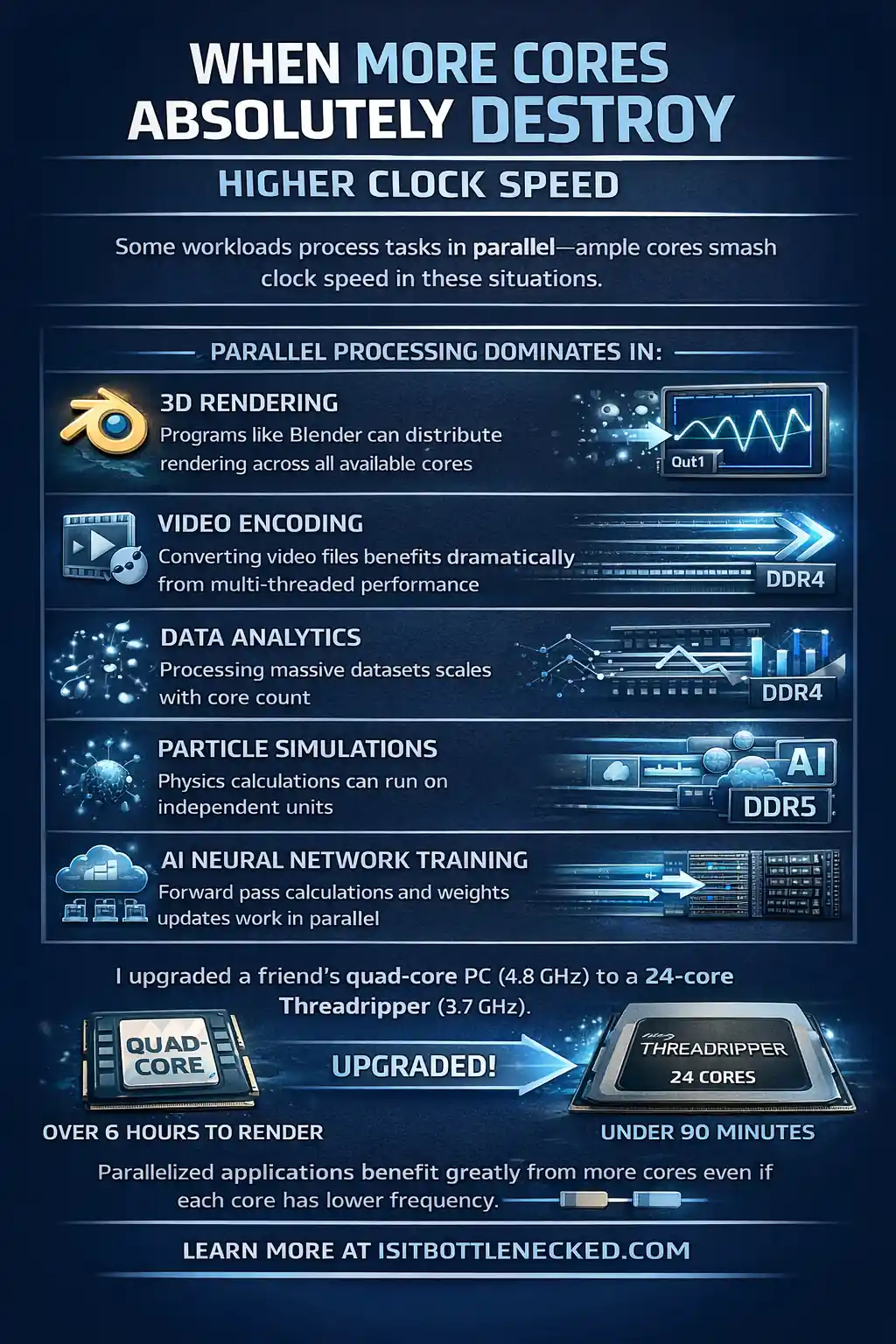
Parallel processing dominates in:
- 3D rendering – Programs like Blender can distribute rendering across all available cores
- Video encoding – Converting video files benefits dramatically from multi-threaded performance
- Data analytics – Processing massive datasets scales with core count
- Particle simulations – Physics calculations can run on independent units
- AI neural network training – Forward pass calculations and weights updates work in parallel
- Cloud virtualization – Running multiple virtual machines or instances simultaneously
- HPC applications – Scientific problems divisible into sub-tasks
I remember building a rendering workstation for a friend last year. He was stuck on a quad-core processor with high frequency at 4.8 GHz. Rendering times were brutal—sometimes 6+ hours for complex scenes.
We upgraded to an AMD Threadripper with 24 cores running at 3.7 GHz. His render times dropped to under 90 minutes for the same projects. The gains were outstanding.
The multi-threaded applications greatly benefit from having workers at your disposal, even if each individual worker operates at a lower frequency.
Real Numbers: Multi-Core Scaling
According to test results performed on popular rendering benchmarks, going from 8 cores to 16 cores can nearly double your throughput in CPU-rendering tasks. That's linear scaling.
However, there are diminishing returns beyond a certain point. Going from 64 cores to 128 cores doesn't always mean you'll double performance again. Factors like memory bandwidth, software optimization, and thermal constraints come into play.
For workloads like CFD (computational fluid dynamics), molecular dynamics with GROMACS, or finite element analysis using Ansys solvers, the CPU role is crucial. These applications can use dozens of threads efficiently.
When High Clock Speed Crushes Core Count
On the other hand, single-threaded or lightly-threaded tasks don't benefit from extra cores. They need raw per-core performance—meaning high clock speed is king.
Clock speed wins for:
- Gaming – Most games are serial tasks that rely on strong single-core performance
- File compression – Many compression tools are single-threaded
- Mathematical generation – Sequential calculations that can't be parallelized
- Web browsing – Most browsers don't use many cores
- Office programs – Word processors and spreadsheets run on fewer threads
- Real-time previews – Video editing previews often depend on single-core speed
In the early days of computing, I remember when a program froze, your entire computer would likely freeze too. The problem was everything ran on a single core. Today, having multiple cores ensures one frozen program won't clog the whole system.
But for gaming specifically, you want high frequency. According to benchmarks from major tech publications, a 6-core CPU at 5.0 GHz will often outperform a 16-core chip running at 3.5 GHz in frame rates.
The game simply can't split the workload effectively across all those cores. Physics calculations, AI, and game logic often run on just a few threads.
The Gaming Sweet Spot
For gaming in 2026, you want at least 6 cores to handle background tasks and keep things smooth. But beyond 8-12 cores, the benefits plateau dramatically.
Clock speed becomes the main difference in CPU intensive vs GPU intensive games. High-end frame rates at 1080p or competitive gaming absolutely demand high clock speeds.
Modern processors from both AMD and Intel offer turbo mode functionality. The chip automatically raises frequency on active cores depending on the workload. This shift means you get the best of both worlds—solid core counts with high boost clocks when required.
The Trade-Offs You Need to Know
Here's where it gets real. You can't just have 64 cores all running at 6 GHz. There are technological limitations and trade-offs.
Power consumption matters. More cores at higher clock speeds draw massive amounts of power. Heat becomes a problem. Cooling becomes expensive.
Early chip manufacturers tried to continually increase clock speeds. We hit a wall around 4-5 GHz for mainstream chips. Rather than working tirelessly to push higher, they added more cores.
The result? Today's modern processors are an architectural marvel, balancing core count and clock speed according to thermal and power constraints in an ideal world.
Realistic Expectations
Most workstation processors like the AMD Threadripper 9965WX or Intel Xeon W9-3575X run at lower base clocks (around 2.5-3.5 GHz) but pack 24-64 cores. Server EPYC chips like the 9755 can have even more.
Desktop processors like the AMD Ryzen 9 or Intel Core i9 series offer fewer cores (8-16) but higher boost frequencies (5.0-5.7 GHz).
You pick based on your workload type. It's a clear trade-off. You can't have everything without paying for extreme cooling and power costs.
How This Impacts Your Build Decisions
Let me walk through real scenarios where this choice matters.
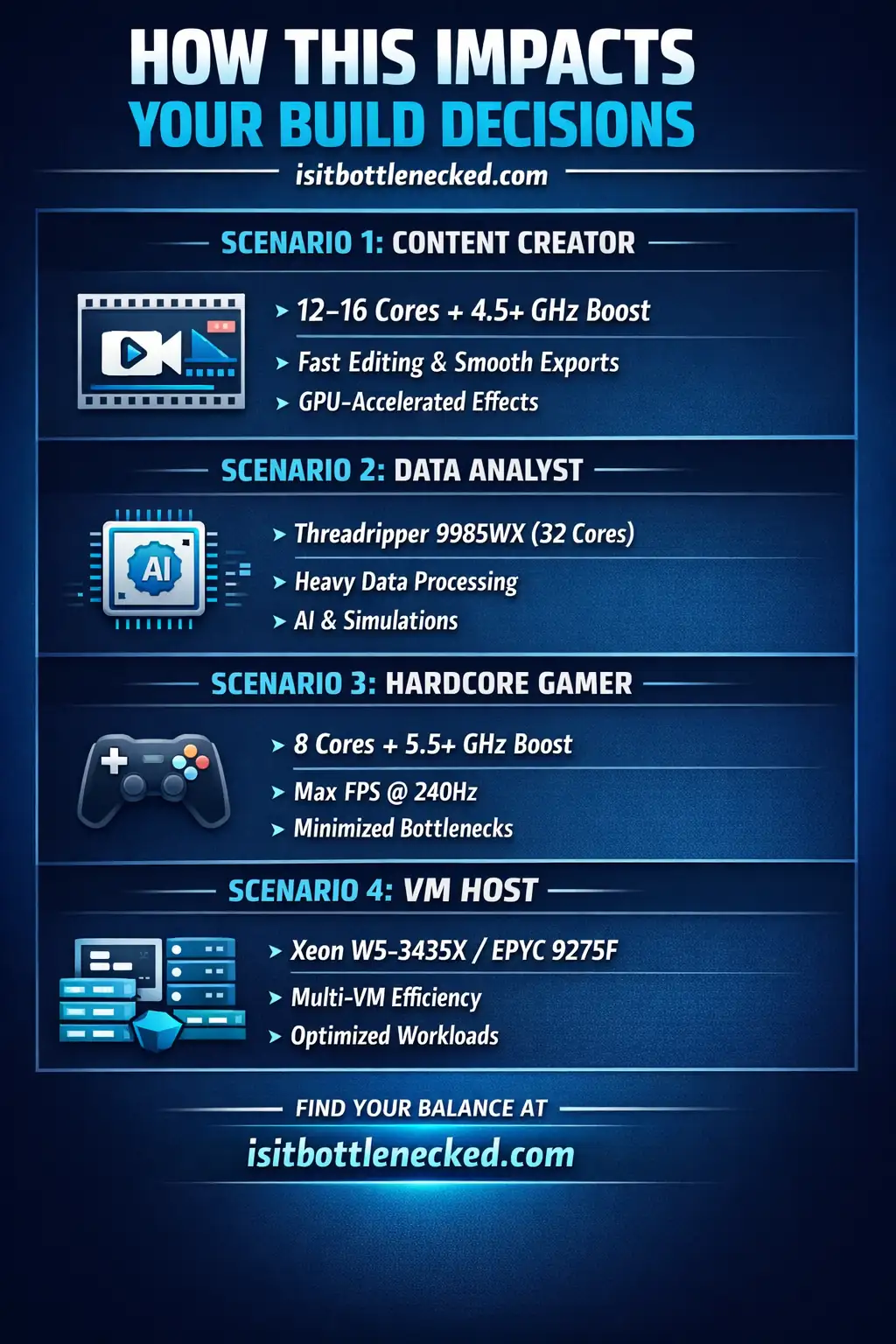
Scenario 1: Content Creator (Video Production)
You're editing 4K videos, doing color grading, and encoding exports. What do you need?
- Editing and real-time previews benefit from high clock speed for responsiveness
- Encoding and exporting scale dramatically with core count
The answer? You want a mix. Something like a 12-16 core processor with decent boost clocks (4.5+ GHz). This gives you smooth editing without stuttering while keeping export times reasonable.
Pairing this with a strong best gaming CPU GPU combo ensures GPU-accelerated tasks like effects and previews also run well.
Scenario 2: Data Analyst
You process data in Python, run machine learning models, and analyze large datasets. Core count dominates here.
Training AI models, running simulations, and batch processing all benefit from parallel threads. A Threadripper 9985WX with 32 cores will crush this workload compared to an 8-core chip, even if the latter runs faster per core.
Scenario 3: Hardcore Gamer
You play competitive FPS games at 1080p with a high refresh rate monitor (240Hz+). You want the highest possible frame rates.
Clock speed is your best friend here. An Intel Core i9 or AMD Ryzen 9 with 8 cores and 5.5+ GHz boost will deliver better results than a 24-core workstation chip.
Check your setup with a bottleneck calculator to ensure your GPU isn't the limiting factor either.
Scenario 4: Virtual Machine Host
You're running multiple virtual machines for development or cloud services. Each instance needs dedicated compute resources.
More cores win. You want something like a Xeon W5-3435X or EPYC 9275F that can handle multi-instance setups efficiently. Clock speed matters less when you're distributing workloads across virtualized environments.
Newer Processors Change the Rules
Here's something crucial people miss. Newer processors with better instructions-per-clock (IPC) can outperform older chips even at lower frequencies.
A modern 8-core processor at 4.5 GHz might destroy a 5-year-old 8-core chip running at 5.0 GHz. Why? Architectural improvements, better IPC, and smarter execution.
This is why you can't just compare specification sheets. A newer AMD Ryzen or Intel Core generation will handle tasks more efficiently than the previous one, even with similar core counts and clock speeds.
The technology inside the chip has improved. Instructions execute faster per cycle. Memory bandwidth from DDR5 channels helps offset bottlenecks. The whole system works together.
The Money Question: What's Worth It?
Let's talk budget because that's what really matters for most people.
High-core-count processors are expensive. A 64-core Threadripper 9995WX costs thousands. Even mid-range options like the 24-core models carry a hefty price tag.
Meanwhile, mainstream 8-core processors with high boost clocks sell for a few hundred bucks. The price difference is massive.
Ask yourself:
- Will my workload actually use all those cores?
- Am I willing to pay 3-5x more for parallel performance?
- Do I need this power today, or am I "future-proofing"?
For most people building a gaming or general-use PC, spending on a 16+ core CPU is meaninglessly expensive. You're better off investing that money into a stronger GPU or more storage.
However, if you're running a business where time is money—like a rendering service or data analytics—those extra cores can pay for themselves. Calculate the value based on your use case.
Cost Per Core Analysis
Let me illustrate with rough numbers. An 8-core processor might cost $300, meaning $37.50 per core. A 32-core chip at $1,500 costs $46.88 per core.
The cost-per-core seems acceptable, but you also need a more expensive motherboard, better cooling, and possibly a larger power supply. When you factor in all collateral costs, the total capital expenditure grows significantly.
For a small business or startup with little capital before they've grown, buying a beast of a machine might not make sense. Start with something suitable, then upgrade as your needs scale.
Software Matters Just as Much
Here's the nasty truth. If your software isn't optimized for multi-threading, having 64 cores won't help.
Many applications are still written and compiled to use only a few threads. Some older programs function in a single-threaded fashion, making extra cores completely underutilized.
Before investing in a high-core-count system, review how your specific applications perform. Look into documentation from software vendors, consult benchmarks, or speak with sales engineers who can guide you.
For example, some engineering simulation tools like Ansys offer per-core licensing packages. Having more cores means paying more for software licenses. That's a factor you need to consider.
On the flip side, GPU-accelerated computing with NVIDIA GPUs can offload certain tasks entirely. Deep learning, drug discovery, and some CFD work can run on GPUs instead of relying purely on CPU cores.
The main point is this: understand your software before buying hardware.
Hybrid Approaches and Future Trends
The market has changed. Newer processors often combine high-performance cores (P-cores) with efficient cores (E-cores). This hybrid approach lets you handle both single-threaded and multi-threaded workloads on the same chip.
Intel's newer architecture uses this model. You get 8 P-cores running at high clock speeds for demanding tasks, plus 16 E-cores for background processes. It's like having the brawn of a high-speed engine along with the smarter, dynamic management of resources.
AMD has also introduced similar technology, although their approach differs. Either way, the industry is moving toward configurable solutions that adapt to workload demands.
This trend will continue. You won't need to choose between cores or clock speed as rigidly in the future. Chips will dynamically shift resources based on what you're doing.
Real-World Testing: What I Found
I recently tested two systems side by side for a client. One had a 24-core Threadripper 9965WX at 3.7 GHz base (4.5 GHz boost). The other had an 8-core Intel Core i9 at 3.6 GHz base (5.8 GHz boost).
Gaming results: The 8-core system won easily. Frame rates were 15-25% higher in most games. The single-threaded performance and high boost clocks made all the difference.
Rendering results: The 24-core Threadripper finished Blender renders in half the time. It wasn't even close. The parallel workload used every core.
Video encoding: Again, the Threadripper crushed it. Export times were dramatically faster.
Day-to-day use: Both felt fast for browsing, office work, and general tasks. The difference was minimal for typical use cases.
The test proved what we already knew. Match the CPU to your workload. Don't buy specs you won't use.
Should You Upgrade or Build New?
If you're thinking about upgrading from an older system, consider the lifespan gaming PC components last before needing replacement.
Most of the time, you're better off with a newer processor at lower core counts than keeping an old high-core-count chip. The architectural improvements and IPC gains matter more than raw core numbers.
When building new, think about what you'll actually do with the machine. Be honest with yourself. If you game 90% of the time and edit videos occasionally, don't buy a 32-core monster.
Choose the best motherboards with processor combinations that fit your budget and goals.
Expert Recommendations by Use Case
Let me simplify this into clear recommendations:
For Gaming:
- 6-8 cores minimum
- High boost clocks (5.0+ GHz)
- Focus on single-threaded performance
- Example: AMD Ryzen 7, Intel Core i7
For Content Creation (Video/Photo):
- 12-16 cores sweet spot
- Decent boost clocks (4.5+ GHz)
- Balance between cores and speed
- Example: AMD Ryzen 9, Intel Core i9
For 3D Rendering & Simulation:
- 24+ cores if budget allows
- Lower clock speeds acceptable
- Maximize multi-threaded performance
- Example: AMD Threadripper PRO, Intel Xeon W
For Data Science & HPC:
- 32-64+ cores for large-scale work
- Memory bandwidth crucial (DDR5 channels)
- Server-grade if needed
- Example: AMD EPYC, Intel Xeon Scalable
For General Office/Home Use:
- 4-6 cores plenty
- Moderate clock speeds fine
- Don't overspend
- Example: AMD Ryzen 5, Intel Core i5
The Bottom Line on CPU Core Count vs Clock Speed
The answer depends on what you're running, and most people are running software that benefits more from fast single-core performance than from a high core count.
For the majority of gaming and general use builds, 8 to 12 cores with strong boost clocks covers everything without waste. You only need to go higher if the specific applications you use actually scale with core count — video encoding, 3D rendering, scientific workloads. Not because the spec looks impressive.
Before buying anything, look up benchmarks for the software you actually use. Not synthetic tests. The applications you'll open every day. That'll tell you more than the number on the box.
FAQs
What's the difference between core count and clock speed? Core count is how many independent processing units are in the chip. Clock speed is how fast each one runs. They measure different things — more cores means more simultaneous work, higher clock speed means each piece of work gets done faster.
Is clock speed or core count better for gaming? Clock speed, in most cases. Games tend to run on a small number of threads rather than spreading work across every core available. An 8-core chip at 5.5 GHz will typically outframe a 16-core chip at 3.5 GHz in the same price range. You still want at least 6 to 8 cores — modern titles use them — but going much higher than that rarely moves the frame rate needle.
How many cores do I actually need in 2026? Gaming sits comfortably at 6 to 8. Content creation starts benefiting noticeably at 12 to 16. Professional 3D rendering and simulation can use 24 or more if the software is written to scale that far. General office use is fine at 4 to 6. Past those ranges, the extra cores don't get used often enough to justify the cost.
Can a chip with fewer cores but higher clock speed outperform one with more cores? For single-threaded work, yes — often by a lot. If the software doesn't distribute its workload across cores, the speed of each individual core is all that matters. The question is whether your specific applications actually thread well, which benchmark results for those programs will tell you faster than spec comparisons will.
What are diminishing returns with core count? Past a certain point, adding cores stops producing proportional gains. Going from 8 to 16 cores can roughly double performance in software built for it. Going from 64 to 128 rarely comes close — memory bandwidth, thermal output, and software optimization all cap out before the hardware does.
Does clock speed still matter with a high core count? Yes. Each core's speed determines how fast it handles its share of the work. For workloads that parallelize well, more slower cores often wins. But clock speed stays relevant — it just gets outweighed when the software can actually use everything available.
Why can't clock speeds just keep increasing? Around 4 to 5 GHz, the power and thermal cost of going faster becomes the limiting factor. Higher frequencies need more voltage, more voltage generates more heat, and the cooling required becomes impractical. Adding cores was the industry's answer — more total throughput without the physics problem of pushing each core faster.
Are 4-core processors obsolete in 2026? Not for light use. Web browsing, office applications, casual tasks — a 4-core chip handles those without problems. For gaming or anything more demanding, 6 to 8 cores is the practical floor. Several recent titles show measurable performance differences between 4-core and 6-core chips, and that gap is likely to widen.
What matters more for video editing — cores or clock speed? Different parts of the job pull in different directions. Editing responsiveness and real-time previews depend on fast single-core performance. Export and encode times scale with core count. A chip in the 12 to 16 core range with boost clocks above 4.5 GHz handles both without making obvious compromises on either.
How do I tell if my software actually uses multiple cores? Run the program through an intensive task and watch per-core usage in Task Manager or HWiNFO. Most cores busy means it's threaded. One or two cores maxed while the rest idle means it's single-threaded — and buying more cores won't change that.
Cores or clock speed for programming and compiling? Compiling large projects scales well with cores — parallel build jobs cut compile times in a way that's hard to miss on a 16-core chip versus an 8-core one. Running code, debugging, and working in smaller files favors single-core speed. If your work involves both, 12 to 16 cores with strong boost clocks covers the range without obvious compromises.
How does core count affect power consumption? More cores means higher draw under full load. That said, running more cores at moderate clock speeds can be more power-efficient than fewer cores pushed to their frequency ceiling. Modern chips manage this automatically — idle cores power down, active ones boost when thermal headroom allows.