Lifespan of Gaming PC: How Long Parts Last (2026)
Most gaming PCs don't suddenly die. They just get slower until you can't ignore it — which is a different problem than hardware failure, even if it feels the same when your frame rate tanks.
There are really two timelines to track: when something breaks, and when it still works but can't keep up anymore. A GPU can run for eight years without faulting and still feel useless at 4K. A cheap PSU might not make it to three. Mixing those two up is how people either panic-upgrade parts that had years left, or hold onto something that's genuinely bottlenecking everything else.
What follows is how long each part — GPU, CPU, motherboard, PSU, storage, RAM, cooling — actually lasts in practice, and what tends to go wrong first.
Lifespan of gaming pc, what lasts, what feels outdated, and what dies first
A PC can stop working for you in two completely different ways. The hardware dies — PSU fails, GPU starts artifacting, something just stops turning on. Or everything still runs but feels slow — new games stutter, settings you used to max out now need pulling back, a new monitor makes the frame rate feel worse than it did before.
People mix these up and end up either replacing parts that had years left, or holding onto something that's dragging the rest of the system down.
For a build with decent parts that didn't run hot: expect around five years of feeling genuinely fast, and five to eight of still being usable. Some systems go longer. Some don't make it to three. Heat, load, and part quality do most of the deciding.
The real upgrade trigger, new games, new monitors, or new goals
Most upgrades happen because the goalposts move, not because the PC dies.
You might go from:
- 1080p 60 FPS to 1440p 144 FPS
- “medium settings are fine” to “I want ultra and ray tracing”
- single-player to streaming plus Discord plus a browser full of tabs
Example: your PC boots fine, Windows feels snappy, but the moment you demand 120 FPS in newer titles, it starts dropping frames. Nothing is broken, your target just changed.
What usually kills a PC early, heat, dust, and bad power
Most parts don’t “run out of time.” They fail early because of stress.
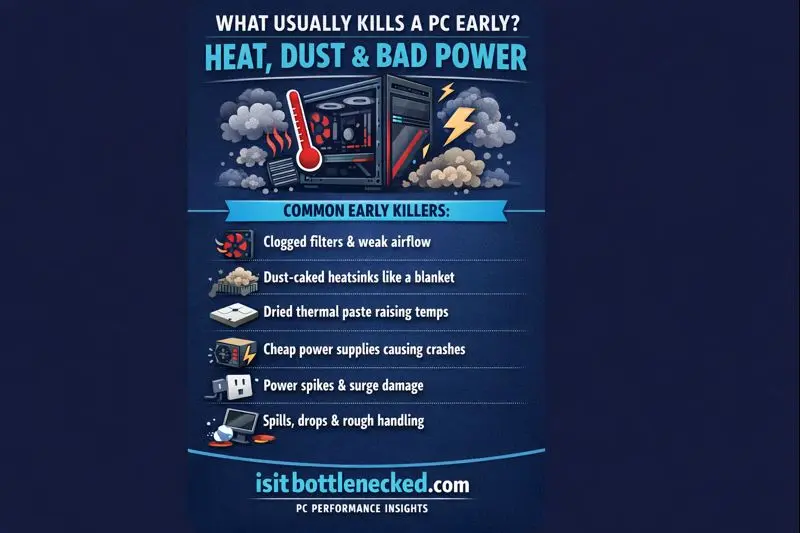
Common early killers:
- Heat from clogged filters and weak airflow
- Dust insulating heatsinks like a blanket
- Dried thermal paste causing higher temps over time
- Cheap PSU power that causes crashes, or worse
- Power spikes from bad outlets or storms
- Spills, drops, or rough handling during moves
If you want one big rule, it’s this: control heat and power, and the lifespan jumps.
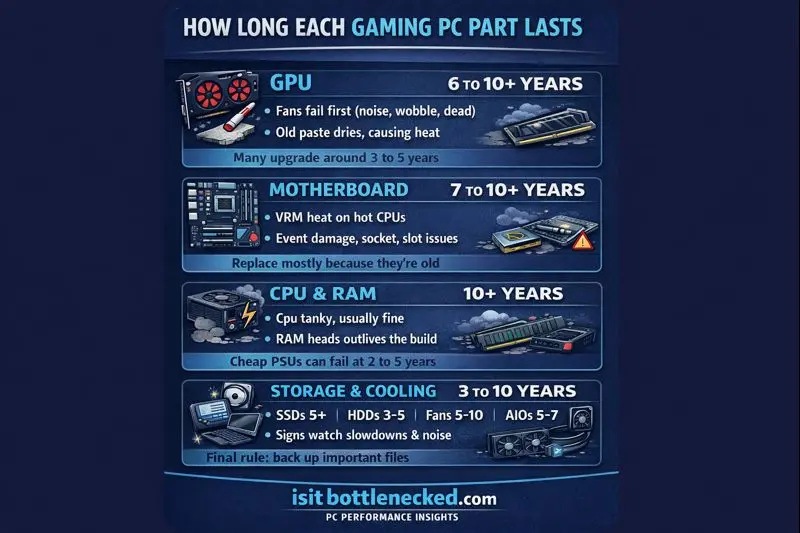
How long each gaming PC part lasts (GPU, motherboard, CPU, PSU, SSD, RAM, cooling)
This is the part people actually care about. Here’s what I see most often, and what recent lifespan roundups commonly report (with the big reminder that “slow” and “dead” are different).
Graphics card lifespan, when the GPU is still alive but feels slow
A graphics card can physically last 6 to 10+ years with good temps, but many people upgrade around 3 to 5 years because games and settings get heavier.
Recent general estimates often put the “average GPU lifespan” around 4 to 5 years, mostly because that’s when people replace them, not because the silicon suddenly dies.
What fails first on GPUs:
- Fans (bearing noise, wobble, or dead fan)
- Old thermal paste and dried pads raising hotspot temps
- VRAM heat causing random crashes or artifacting
- Unstable overclocks that were “fine” until they weren’t
When I’m timing an upgrade, I focus on balance, not hype. If you’re shopping around that 3 to 5-year mark, I like using lists of best CPU GPU combos so the new card doesn’t get held back.
Motherboard lifespan, the part you rarely replace on purpose
A motherboard often lasts 7 to 10+ years if it avoids damage and bad power. Most boards don’t die from age, they die from events.
What actually kills boards:
- VRM heat on cheaper boards running hot CPUs
- Aging capacitors (slow decline, then instability)
- Power events, short circuits, liquid damage
- Bent CPU socket pins, damaged PCIe or RAM slots
The bigger “lifespan” limit is the platform. Even if the board works, a new CPU generation might not fit. If you’re planning a platform change, a guide with motherboard and CPU picks helps you avoid buying into a dead-end socket.
CPU and RAM lifespan, boring parts that often last the longest
CPUs are tanks. Physically, a CPU can last 10+ years if you keep it cool. For gaming relevance, it’s more like 5 to 7 years, depending on your FPS goals.
Some general lifespan summaries put CPUs around 4 to 5 years, again because that’s when people swap them, not because the chip “expires.”
RAM is even more boring (in a good way). It’s very reliable, and many manufacturers warranty it for a long time. You’ll hear claims that RAM can handle 10^15 to 10^16 write cycles, which is a ridiculous number, and matches what I see in real life: RAM usually outlives the build.
What shortens life:
- High temps
- Too much voltage
- Unstable memory overclocks
My tip: stable settings beat max settings. Every time.
PSU lifespan, the part that can take others down with it
If you care about the lifespan of gaming pc, care about the PSU.
Good PSUs often last 7 to 10+ years. Cheap units can fail around 2 to 5 years, and they can cause crashes, corruption, or damaged parts.
What wears PSUs out:
- Heat (tight cases, dust, bad airflow)
- Capacitor aging
- Running near max load nonstop
- Power spikes and bad surge protection
If you want safer picks, I’d start with best power supplies.
Storage and cooling lifespan, SSDs, HDDs, fans, and AIOs
Storage fails because it’s storage. Plan for it.
- SSDs: often 5+ years (often longer for gaming use)
- HDDs: often 3 to 5 years, with higher risk as they age
- Case fans: often 5 to 10 years
- AIO liquid coolers: often 5 to 7 years
Signs to watch:
- SSD slowdowns, errors, or warning tools flagging health
- HDD clicking, bad sectors, long hangs
- Fans getting loud or rattly
- AIO pump noise, rising temps, sudden spikes under load
One simple rule: back up important files. Drives will die someday.
Make your gaming PC last longer, a simple plan that works
This isn’t complicated. It’s discipline.
If I want a PC to last, I manage three things: temps, power, and smart upgrades. I also match upgrades to what I play, because a sim game and a ray-traced shooter stress very different parts. If you want to make smarter choices, this breakdown of CPU vs GPU games keeps you from buying the wrong part.
The 20-minute maintenance routine (every 3 to 6 months)
I set a timer and do this:
- Clean dust filters (front, bottom, top).
- Blow out heatsinks and fans (hold the fan so it doesn’t free-spin).
- Check temps while gaming, watch CPU and GPU hot spots.
- Make sure fans ramp up when temps rise (basic fan curve check).
- Re-seat any loose power cables if something looks off.
- Keep the PC off thick carpet if the PSU intake is choking.
If you have pets or smoke, you clean more often. No debate.
Know when to upgrade instead of replacing everything
Here’s my quick decision rule:
- If most games are struggling at higher settings, upgrade the GPU first.
- If you’re stuttering with tons of background tasks, add RAM (or fix bloated apps).
- If your drive is full or load times are painful, add SSD space.
- If the PSU is low quality or old, replace it early, it’s not worth gambling.
- If the CPU is the limiter, it’s time for a platform upgrade (CPU plus motherboard, sometimes RAM).
Balanced parts waste less money. If you’re not sure what’s holding you back, I start by running a quick test to check your bottleneck.
Conclusion
Most builds don't fall apart on a schedule. Age matters less than how the system was treated — a five-year-old PC that ran cool will often outlast a newer one that sat in a hot case with a struggling PSU.
The parts that fail first are rarely the ones people worry about. Fans, drives, and cheap PSUs are what actually go. CPUs and RAM just keep running. The GPU is somewhere in the middle — it can last a decade or die at four, depending on how hard it worked and whether the cooling held up.
If you want a real answer about your specific setup, share your specs, weekly hours, and resolution. I'll give you an honest take on what's likely to go first and whether it's worth upgrading now or riding it out.
FAQs about the lifespan of gaming PC parts
How long should a gaming PC last before upgrading? Depends what you mean by "last." Performance-wise, 3–5 years is when things start feeling dated. Hardware-wise, decent parts can run 8+ years without dying on you. Resolution changes the math. 1080p/60 is pretty forgiving — you can squeeze a lot of life out of mid-range hardware. 1440p/144 Hz pushes you toward upgrades faster. 4K is basically a treadmill; you'll be buying a new GPU before you want to.
What fails first in a gaming rig? Fans, because they never stop spinning. Hard drives, because moving parts wear out and age compounds that risk. And cheap PSUs — not because they fail quietly, but because when they go bad, they tend to take things with them. The power supply is the one component where spending a bit more actually protects everything else.
Is a used GPU worth buying? Usually yes. Check temps under load, listen for fan noise, look at how much dust has packed in, run a stress test. Mining history is the big unknown — if the seller can't tell you, or won't run it in a real game while you watch, that's your answer.
Does overclocking hurt longevity? A mild overclock with safe voltage and good cooling probably doesn't matter much. Pushing high voltages or running hot for years is a different story. The rule I follow: if you can't keep it cool, don't push it. Heat is what actually kills hardware.
How do you know a motherboard or PSU is starting to fail? Random shutdowns and boot loops are the obvious ones. But also watch for USB ports dropping out randomly, a burning smell anywhere near the case, coil whine that's changed pitch, or instability that only happens under load. PSU symptoms especially — don't sit on those. It's the one failure that can cascade through the whole system.