SLI and CrossFire Multi-GPU Configuration | Is it Relevant?
SLI and CrossFire Multi-GPU Configuration was a dream once.
Every gamer wanted dual graphics cards bathed in red and green glow.
The promise was simple: combine two GPUs, crush every game, reach ultimate performance.
Fast forward to today.
Multi-GPU setups feel like relics.
Expensive ghosts haunting enthusiast forums.
What happened?
Is SLI and CrossFire truly dead?
Can it still cling to life in specialized corners?
Let's dissect this surprising afterlife.
What SLI and CrossFire Multi-GPU Configuration Actually Means
Imagine building a house.
You have two construction crews instead of one.
Each crew has its own foreman.
They're designed to coordinate and work together.
That's a dual graphics card setup in simple terms.
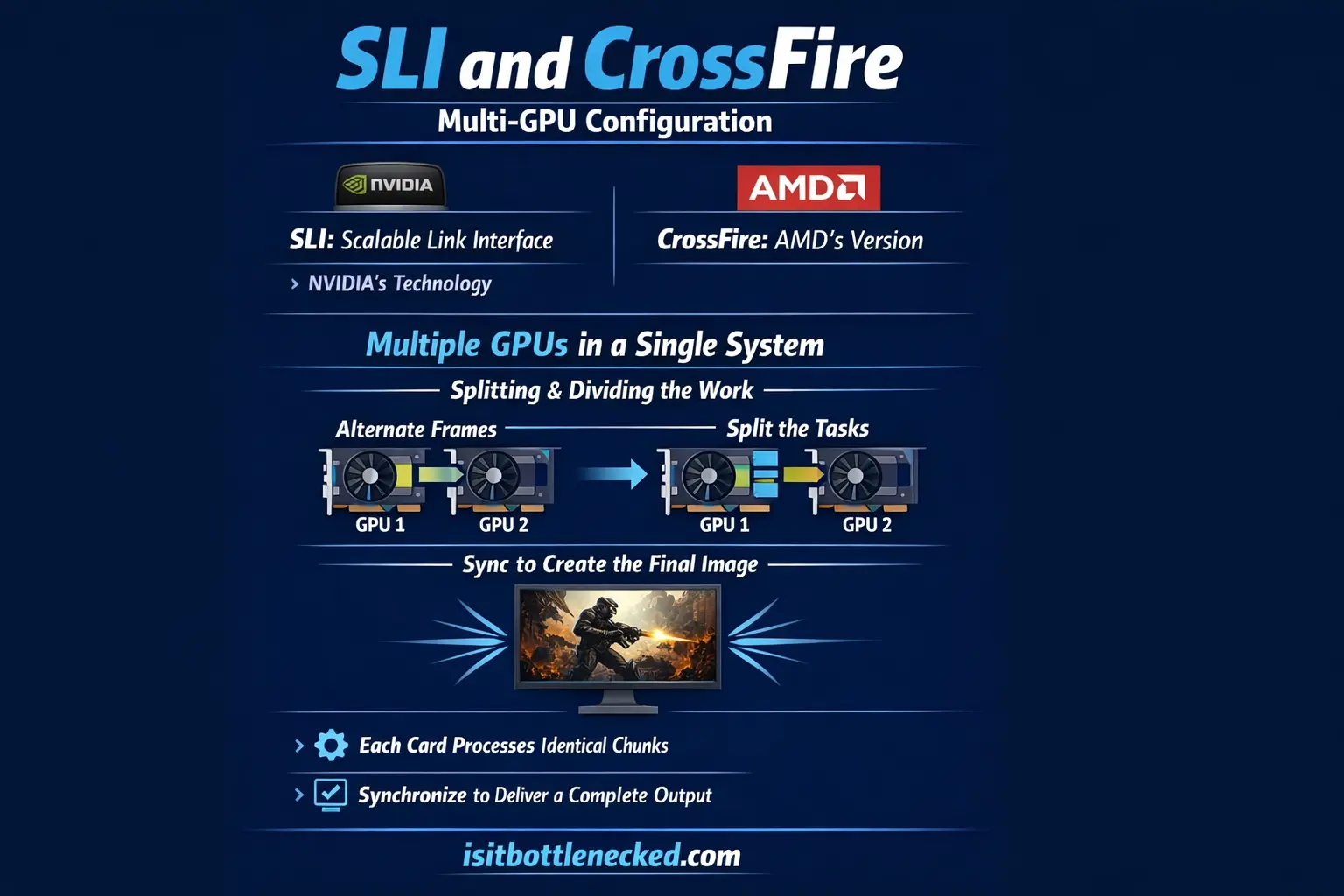
SLI stands for Scalable Link Interface.
It's NVIDIA's technology.
CrossFire is AMD's version.
Both technologies allowed users to implement multiple graphics cards in a single system.
The core idea was to split and divide the work.
Two cards could alternate frames or split tasks.
Each card works on identical chunks of output.
Then they synchronize their efforts to deliver a physical image.
In theory, this should give you close to double brute performance.
Parallelism worked in pockets.
When it worked, it required infinite patience.
The Glory Days of Multi-GPU Gaming
The mid-2000s were the peak.
Back then, walls were clear for early adopters.
Enthusiasts embraced dual card configurations.
They often saw decent gains in supported titles.
Flagship GPUs were the undisputed kings.
Tech magazines and gaming websites breathlessly covered SLI and CrossFire showdowns.
The community positioned these technologies as the ultimate gaming solution.
If someone had high demands and a high-end budget, the idea of having two or three cards seemed like a good thing.
Surely two graphics cards are better than one.
But cracks started to appear.
The Technical Flaws That Killed Multi-GPU
Micro-Stutter Was the Biggest Problem
Micro-stutter became the biggest technical flaw.
This is uneven frame delivery.
Frame times were perceptible.
You'd get hitching and judder even when frame rates looked smooth on paper.
Micro-stutter was notoriously hard to eliminate.
It arose from asymmetric load distribution between cards.
This caused excessive variance in frame delivery.
Games would show great results on paper but feel terrible to play.
Understanding CPU bottlenecks became critical because multi-GPU systems were incredibly sensitive to component mismatches.
Spotty Developer Support
Not every game explicitly supported multi-GPU configurations.
Developers didn't always bother.
Smaller studios focused on console ports.
New titles got stuck using single-card profiles until a driver update arrived.
Support was spotty at best.
You'd pay for two flagship GPUs and get diminishing returns.
Third cards rarely hit performance targets.
Adding a fourth card might yield almost nothing.
Modern game engines became incredibly difficult to optimize for multi-GPU configurations.
Deferred rendering and complex frameworks made it nearly impossible to efficiently distribute workloads across both cards.
Power and Heat Became Unmanageable
Consumption per generation increased drastically.
Cost skyrocketed.
Noise levels rose.
Power supplies had to suck immense wattage.
Think about it.
You're running two massive heat-generating GPUs.
Each demands aggressive cooling.
Your case becomes a furnace.
Cooling solutions turn loud.
Many users found that fixing bottlenecks with a single powerful GPU was far easier than managing dual-card thermal nightmares.
Your power requirements became a serious household consideration.
Circuit breakers, dedicated outlets, robust PSUs rated at nuclear wattage.
It was a thermal nightmare.
Why Single-GPU Solutions Won
The perfect storm hit.
Economics, developer apathy, and technical limitations collided like magnets.
GPU manufacturers began developing single cards that were vastly powerful.
They focused intensely on optimizing performance in one chip.
These cards could utterly demolish what dual configurations offered years ago.
A single flagship model now offers better performance without requiring coordination between components.
No bridge cables, no software lottery, no driver gambling.
Just plug in your card and play games.
The tech moved toward monolithic powerhouses.
Buy the fastest GPU you can afford.
It will outperform old dual-card rigs.
It will run cooler, quieter, and generate zero micro-stutter.
Developers stopped investing resources in multi-GPU optimization.
NVIDIA officially stopped actively promoting SLI years ago.
AMD scaled back CrossFire support prior to that.
Though implicit support lingers, active promotion vanished.
Where Multi-GPU Still Has a Pulse
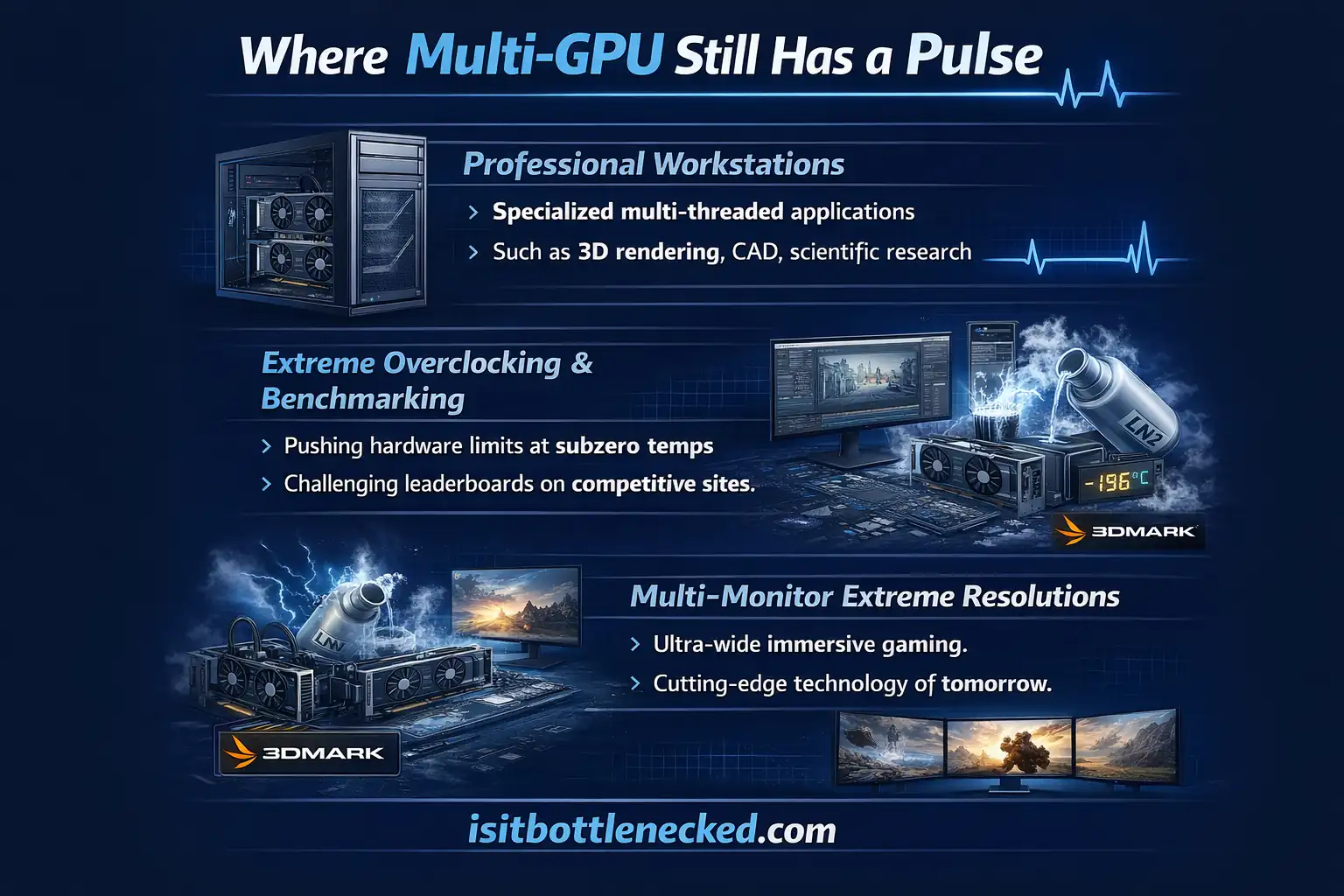
Multi-GPU isn't quite extinct.
It's found niche scenarios where raw compute power trumps smooth frame pacing and polish.
Professional Workstations
Rendering, machine learning, scientific applications, and cryptocurrency mining still benefit from multi-GPU setups.
These workloads can distribute tasks across cards efficiently.
Each GPU works on separate chunks independently.
Professional workstations leverage multiple cards for deep learning frameworks.
Training datasets get split across memory pools.
Video rendering engines distribute scene simulations efficiently.
Operations needing near-linear scaling and massively parallelized tasks thrive here.
Password cracking, protein folding at home, scientific simulations all work well.
These don't require synchronization between cards.
Extreme Overclocking and Benchmarking
Enthusiasts chasing world records still employ multi-GPU configurations for testing.
This is strictly the realm of overclocking and benchmarking.
They're not gaming daily on quad Titan setups.
Legacy titles and pre-2018 games occasionally show benefits.
Shadow of the Tomb Raider, The Witcher 3, a handful of older shooters with explicit support can leverage dual GPUs.
But these are rare exceptions.
Multi-Monitor Extreme Resolutions
Driving multiple simulators or screens at extreme resolution sometimes benefits from dual cards.
A single flagship GPU might struggle with ultra-high resolutions.
Splitting the workload solution can help.
However, tier-one CPUs can easily become overwhelmed feeding two GPUs at these resolutions.
This negates much of the benefit.
You'd need a dedicated CPU just for handling syncing tasks.
The Reality of Setting Up Multi-GPU Today
If you're still considering a dual graphics card setup, here's the simple reality.
First, verify your motherboard is compatible.
Check the product page specifications.
Look at the box model information.
Consult the manual for chipset capabilities and PCIe lane configurations.
Modern motherboards have unique facility layouts for multi-GPU support.
The total number of available lanes is dependent on your chipset.
Selecting the correct slots matters for optimal performance.
Make sure your case has suitable space and gap to accommodate dual cards.
Ensure your power supply has sufficient capacity.
Major manufacturers rate their products with recommended wattage clearly marked.
You'll need the necessary connectors factored in.
Don't connect cables trying to force operation.
Vendors mark connectors clearly.
Six-pin and eight-pin connectors are common.
Using certified adaptors is crucial.
Preparation saves hours of anguish.
Remember to remove any protective cover from slots.
Free the area from dust and debris through visual inspection before inserting cards.
Physically install the graphics cards.
Line them up exactly right.
Use firm pressure but don't force anything.
Cards should fit secure with latching mechanisms or thumb screws at the rear.
Connect the bridge cable.
This inter-card link is needed for SLI and CrossFire operation.
The bridge normally comes supplied with flagship models.
However, you can find preferred components at any retailer.
Boot your system.
Make sure installation is complete.
Confirm cards are securely screwed and seated.
Remove any surplus screws or items left during the process.
Configure the software.
Enable SLI or CrossFire within the respective control panel.
The technology section is located under display properties.
Follow the settings and options to enable operation.
Download the latest driver from the manufacturer before beginning installation.
Ideally, you should perform a fresh operating system setup.
This minimizes hardware errors and reduces the chance of blue screen crashes.
Should You Build a Multi-GPU Rig in 2025?
For mainstream gamers?
Absolutely, unequivocally no.
SLI and CrossFire are dead for gaming.
NVIDIA and AMD abandoned active promotion.
Support has been killed off.
Developers took their fingers off multi-GPU marketing.
Investing in a dual-GPU rig means throwing money at a ghost.
The pulse is faint.
Game support is minimal at best.
Instead, check out the best combos for 2026 and invest in a single powerful GPU that will serve you better.
The lesson is clear.
The quest for ultimate gaming performance continues.
But the path has changed.
It's become smarter and simpler.
The future resides in singular, incredible GPUs that manufacturers pour resources into.
Multi-GPU paved the way.
But that era has passed.
Final Words on SLI and CrossFire Multi-GPU Configuration
There's no denying the impact SLI and CrossFire Multi-GPU Configuration had on the gaming market.
Many people took advantage of the technology.
It gave a performance boost to their computer systems for various tasks.
But the challenges led to disuse.
Single-card solutions replaced multi-GPU configurations.
They became easier to implement and offer better performance.
They provide a higher level of reliability.
That's why nowadays most gamers choose single GPUs.
They're more effective.
You can invest less money to achieve better results.
You'll avoid the headaches that early multi-GPU rigs brought.
The complete picture shows a glaring reality.
Multi-GPU had its brief, glorious moment.
It ruled the roost for a time.
But developer dependency proved insurmountable.
Relentless GPU advancement ultimately made SLI and CrossFire Multi-GPU Configuration obsolete for mainstream use.
Frequently Asked Questions
Is SLI still supported in 2025?
No, NVIDIA officially stopped promoting SLI years ago. While some technical support remains for older cards, it's strongly discouraged for new builds. Modern games lack optimizations, and you'll get minimal gains at best.
Can you mix different GPU models in SLI or CrossFire?
You can't mix different GPU families. Cards must be from the same series with matching memory capacity, though minor variations in clock speeds are acceptable. For example, you could pair two RTX 3080 cards from different manufacturers, but mixing a 3080 with a 3090 won't work.
What's the biggest bottleneck in multi-GPU setups?
Communication bandwidth between cards is the primary bottleneck. Data transfer latency causes micro-stutter and uneven frame pacing. Additionally, insufficient CPU power, poor PCIe lane distribution, and inadequate cooling all create bottlenecks that hurt overall efficiency and performance.
Do professional workstations still use multiple GPUs?
Yes. Machine learning, 3D rendering, scientific simulations, and video editing benefit from multiple GPUs. These workloads distribute tasks independently across cards without requiring frame synchronization. Professional applications leverage raw compute power effectively where gaming cannot.
How much power do dual GPUs actually consume?
Dual flagship GPUs can draw 600-800 watts combined, sometimes more. You'll need a robust power supply unit (850W minimum, 1000W+ recommended) with multiple PCIe power connectors. Factor in additional cooling requirements, which add noise and heat to your system.
What replaced SLI and CrossFire?
Single, vastly more powerful GPUs replaced multi-GPU configurations. Technologies like NVIDIA's DLSS and AMD's FSR use smart upscaling algorithms to boost performance without needing multiple cards. Cloud gaming services also offer an alternative for users wanting high-end performance without local hardware investment.